Sunday, October 5, 2008

Wrath of the Lich King


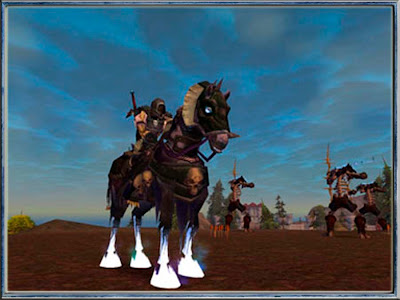
Master the necromantic powers of the Death Knight — World of Warcraft's first Hero Class. Create a new Death Knight character with a starting level of 55 and break the chains of the Lich King to forge your own destiny. Power your way through new quests and dungeons as you seize ever greater abilities. Assault the terrifying Wrathgate, war in Lake Wintergrasp, uncover the secrets of Dalaran reborn and much more.

You've turned the tide against the demonic evils of Outland. Now the Lich King Arthas has set in motion events that will lead to the extinction of all life on Azeroth. With the undead legions of the Scourge threatening to sweep across the land, you must strike at the heart of the frozen abyss and end the Lich King's reign of terror for all time.


The difference of this edition are the ff:
  • Lay waste to destructible buildings in your path
  • Battle to Level 80 and power your way through new quests and dungeons as you seize ever greater abilities.
  • Master the necromantic powers of the Death Knight.
  • Command mighty siege engines to bombard your enemies.
  • Discover the harsh, icy continent of Northrend, the bleak heart of the Lich King's empire of undeath.


Here are some sneak previews:


Friday, September 26, 2008

Free Online Games, Downloads and Lots of Arcade Games For Kids and Adults


This will be my very first post so I want this one to be remembered, especially by all the free online games addicts.
As I was studying my first move, i decided to have it as light as possible. I want a useful post for all free arcade gamers, both adult and kids/children.


I got here list of free online games. These list are free arcade games for children and adults.
Hope you enjoy the fun playing these online games.

Here is the list of free online games.

I hope you enjoy the list.. I will be more pleased if you post your replies...

Thank you guys.. Play games!!! Play Arcade Games!!

Friday, September 12, 2008

Light Bot Walkthrough

Light Bot is a fun puzzle game. Simply 'program' your robot to move to each of the blue squares and light it up. You need to learn to be efficient, but each you get two functions along with the main program to play with. So, it's just a matter of learning how to put those repeatable steps into the functions and use those when you can.

If you get stuck, there's a walkthrough below. If you want to try it on your own, play Light Bot at armorgames.

WALKTHROUGH: DO NOT READ BELOW THIS LINE IF YOU WANT TO DO IT ON YOUR OWN!

In each level, your program consists of three sections. The Main, function 1 and function 2. The programs you can put in are left, right, forward, light, jump, function1 and function2. I don't claim this is the most efficient to any of the levels, but it will get you by.

Level 1:
Main program: Forward, forward, light
Function 1:
Function 2:

Level 2:
Main program: Right, forward, left, forward, forward, forward, forward, left, forward, light
Function 1:
Function 2:

Level 3:
Main program: Forward, jump, jump, forward, light, left, forward, light, forward, light.
Function 1:
Function 2:

Level 4:
Main program: Forward, jump, jump, forward, right, forward, forward, forward, forward, forward, light.
Function 1:
Function 2:

Level 5:
Main program: jump, F1, F1, jump, jump, jump, light
Function 1: Forward, forward, forward, light
Function 2:

Level 6:
Main program: F1, right, F1, light, jump, right, F2, right, right, F2, F2
Function 1: forward, jump jump
Function 2: Forward, forward, forward, light

Level 7:
Main program: F2, light, right, forward, right, light, F2
Function 1:forward, light, forward, light, forward, light, forward, light
Function 2: F1, F1

Level 8:
Main program: Jump, forward, light, F2, right, F1, F1, F2, right, F2
Function 1: F2, F2, right
Function 2: Forward, forward, light

Level 9:
Main program: Jump, left, jump, F2
Function 1: jump, light, forward, light, jump, light, right
Function 2: F1, F1, F1, F1

Level 10 (I found this to be the hardest one):
Main program: F1, F2, left, jump, right, F1, F1, F1, F1, left, F2, F1
Function 1: jump, jump, jump, forward, forward, forward, light, right
Function 2: left, jump, left, jump, forward, right, jump

Level 11:
Main program: F1, jump, right, F1, jump, right, F1
Function 1: F2, F2, left, jump, left, F2, F2, right
Function 2: Light, forward, light, forward, light, forward, light, forward

Level 12:
Main program: Forward, jump, light, F1, F1, F1, F2, light
Function 1: Jump, light, Jump, light, jump, light, right
Function 2: Jump, light, jump, light, jump, F1, F1, F1

Friday, May 30, 2008

Applicate ver.0

Applicate Ver.0A new game from the creator of the Grow series is out and it's called Applicate. Very short simple game of dropping apples. There's no directions, but it's not that hard to figure out.

The objective of each of the five levels is to get an apple eye guy (see the image... the apples with eyes in them are apple eye guys) to the door. Every time you click on an apple that is already on the screen, you take a bite out of it, dropping a new apple where the arrow is currently located. If you drop an apple on an uneaten apple, an apple eye guy will appear.

Keep in mind, he will always try walking to the right first. You may need to block his way to get him to turn around and go back to the doorway.

It sounds weird, but the graphics are as good as always. If you need any hints, ask below in the comments and I'll try to walk you through each level.

With only five levels, this is a short game to play if you're interested.

Play Applicate Ver.0 at eyezmaze.

Tuesday, May 13, 2008

Brute Wars

Brute WarsBrute Wars is a pretty good RPG game just released on kongregate. Pick your team of brutes (animals) making sure to balance your magical prowess as well as your brute force. Then get out there and conquer the castles in an attempt to reach mount Asio.

Really, the story line isn't all that exciting, nor is it all that pertinent to the game play.
Just put together the best team you can. You'll have to take into account several different factors to advance.

First, there's a front and a back line. Keep your power hitters up front, and your distance hitters in back. But if someone's taking a beating, it's helpful to have another power hitter to switch in for him.

You only get so many actions a turn, so replacing someone in the front line may use up all your actions for a turn. Later on in the game, you'll have more actions per turn to play with, making it easier to switch men in and out.

The gameplay is not intuitive, so read through the directions.

Magical spells are stronger if you have more of the same type of character (water, fire, brute, etc...) But it also makes it more likely you could go up against someone who's in a great position to hit you in your weak point. I liked to balance things out more.

You can replace some of your characters by getting to a shop and buying a randomizer. That's the only way to get shadow creatures. This option will not be available right away.

You can travel back over spots you've already fought for to engage in random battles and build up points to buy food, syringes (to wake up those dozing creatures -- they've been knocked out) and randomizers. You also need the points to buy the upgrades (treasure chests on the map).

Play Brute Wars at kongregate.

Monday, April 28, 2008

Meet In Ver.0 Walkthrough

Meet In Ver.0The famous author of the Grow series is back with a new game after a prolonged sickness (I'm glad to see he's feeling better!). The new game, Meet In, is like his other puzzle games, but also unlike them. It's cute, short and fun, but definitely has the same feeling to it as his other games.

For a complete walkthrough, look below, but in the meantime, go play!

Play Meet In Ver.0 at eyezmaze.


Walkthrough

In the first box, I'm going to label this one dad. The second box (top right) is going to be mom. The bottom left is baby and the bottom right is kid.

Move the baby onto the blue button. Mom is now free to move down into the hedge maze. Move her onto the button at the bottom of the maze.

Switch to dad and move him onto the moving platform that mom just engaged (just head south in the hedge maze). Move the baby onto the other button on it's screen to move dad to the other side.

Move dad to the right and sit on the bottom of the two buttons to change the stone maze the kid is in. Keep switching the stone maze back and forth and moving the kid around until he is free and in the upper left corner. Move the kid up until he steps on the orange button to remove the orange square for dad to pass through.

Dad can step on the green button to remove the green obstruction from the kids way. Have the kid step on the purple button to remove the purple block from the baby's way.

Dad, kid and baby can now enter the room with MEET on the floor. Place each of them on their respective color to allow mom to enter as well. Switch to mom and bring her in and put her on the final T. You Win!

Friday, April 25, 2008

The Life Ark

The Life ArkA point and click adventure, the Life Ark puts you in charge of developing life on a planet. Develop life through fire, water, alien life forms and big old teapots.

Like Grow, Warbears and Sprout, the objective is to click on the right things in the right order. The actions will take place automatically and you will soon have a green and lush forest along with all the animals (two by two) on your planet to enjoy. But if you click on them in the wrong order, your trees will die off, your little helpers (men) will pass out from the heat, and basically you'll just have to reset and start over.

That is, unless, you were willing to use the walkthrough below.

Play the Life Ark at freeworldgroup.

Walkthrough

The Life ArkClick on the tablet (in the middle of the ground). Choose the right symbol. Note the small circles or triangles or spots or whatever it appears to be that move around the card as you move from card to card. Just complete the pattern. An outlet appears where the tablet was.

Click on the cord hanging from the cloud to get it to start moving. When it's over the outlet, click on the cord again. Click on the outlet. When the cloud gets charged up (turns black), click on the plug to release it.

Click on the cord again to move the cloud over the rock in the volcano. Click on the rock. Click on the door in the mountain. Hit the button in the center until both disks have the fire at the top.

Click on the fire (left side of volcano). The cloud may have floated around. Move it over the mountain again. Click on the steam clouds (circles) floating up.

After the cloud absorbs enough water (turns dark gray), move the cloud out over the pond. Click on the pond to dump some water.

Click on the trees to get an apple to fall. Click on the cave. Click on the apple to get the man to eat it (apple of knowledge). Click on the man (his head) to turn it into an radio signal.

When the spaceship arrives, click on the cave again. Click on the river to get the new man to move the water over to the plant to help it grow. Click on the plant to climb up and get the blue gem.

Click on the fire to change the teapot into another UFO. Click on the picture of the UFO. Click on the read teapot, then on the hatch on the boat. Solve the puzzle (similar to the first one).

Success!